What are diagnostic-compatible iPhone parts?
Written by Pavel MaksymenkoLast updated: 9 August 2026Reading time: 8 min

The term “diagnostic-compatible” is appearing more often in descriptions of iPhone screens and batteries. It sounds official, but it is not. Suppliers use it for parts designed to work more smoothly with the checks around Parts and Service History and Repair Assistant on certain iPhone models and iOS versions.
That distinction matters. A part can be recognised without a warning and still perform worse than an original part. Conversely, an “Unknown Part” message does not mean that your iPhone will be blocked. This article separates Apple’s documentation from suppliers’ own tests.
What does “diagnostic-compatible” actually mean?
“Diagnostic-compatible” is not listed as a status in Apple’s official classification. Apple uses other labels in Parts and Service History, including Genuine, Used, Unknown and Unverified. The term comes from the aftermarket, meaning parts that are not supplied as new genuine Apple parts.
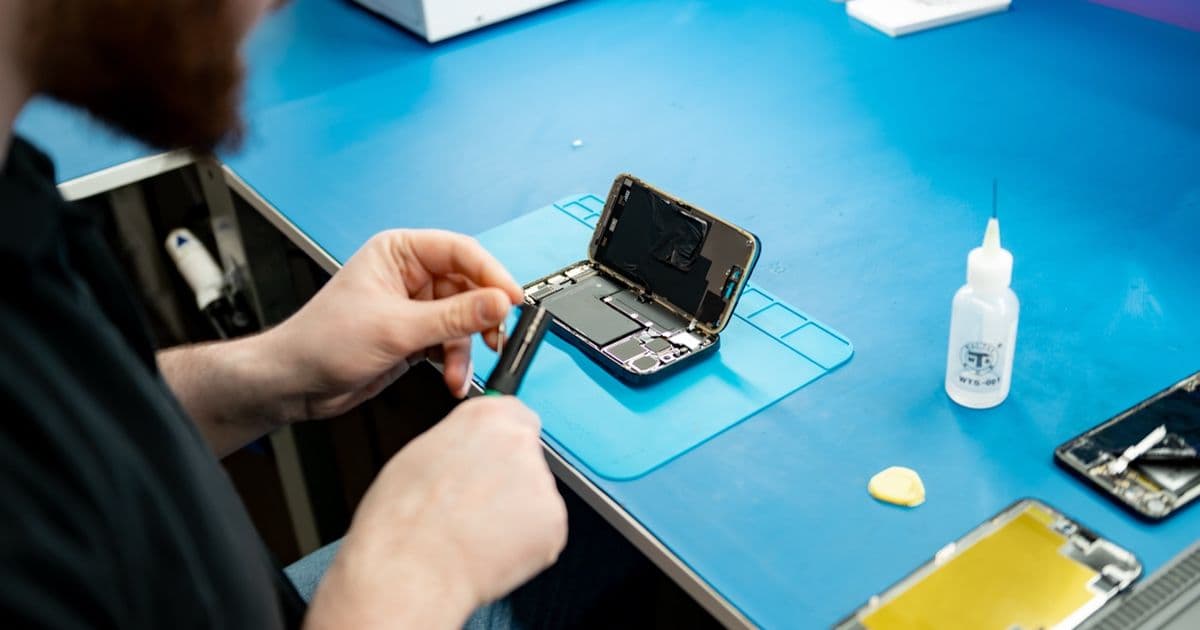
The technical design varies by supplier and product line. Some solutions use data or an original Apple chip recovered from a donor part. Others combine a replacement screen or a new battery cell with extra electronics or pre-programmed information. The usual aim is to retain functions such as True Tone, battery health information, or the ability to complete a repair through Repair Assistant.
None of this proves a particular level of panel quality, cell quality, service life or stability. Two parts carrying the same commercial label can be built differently. Treat the term as a compatibility claim made by the seller, not as evidence that Apple has approved the product.
What Apple officially says about parts and repair history
On supported iPhones, Parts and Service History appears after a repair under Settings > General > About. Apple explains that several labels can appear there. Genuine means that the repair was completed with genuine Apple parts and processes. Used can appear for a supported genuine part that was previously installed in another device. Unknown can mean, among other things, that a part is not genuine, is not working as expected, has not been linked to the iPhone, or cannot be verified.
Apple also explicitly states that these messages do not normally affect your ability to use the iPhone unless the description says otherwise. An Unknown Part message is therefore not a general lock on the phone. It does remain visible in the repair history, and Apple notes that it may affect the device’s trade-in value.
For parts that need calibration, Repair Assistant installs the required calibration data. If the repair is not completed, the part may not perform as well. Face ID or Touch ID can remain limited for security-sensitive parts until the required calibration is complete. Apple also says it will not actively disable a third-party part unless it affects customer security or privacy, as can be the case with biometric authentication.
What does this mean for an iPhone display?
A display replacement involves several separate issues: the quality of the OLED or LCD panel, touch response, brightness, colour, energy use, True Tone and the way the part is recorded. A diagnostic-compatible screen mainly tries to make the final part of that process smoother. It does not make the screen equivalent to a genuine Apple display.
Compatible screens remain a budget option and are always below original display quality. Differences may be visible in maximum brightness, colour accuracy, viewing angles, touch response, power use and durability. The size of the difference depends on the model and exact product line. A status in Parts and Service History does not tell you how good the panel itself is.
If only the outer glass is cracked while the image and touch layer still work correctly, replacing the iPhone glass while keeping the original display can be the best option. If the OLED/LCD image or touch layer is also damaged, review the options for a complete iPhone screen repair. FIXNOW recommends an original display or glass-only repair whenever possible because these options can preserve the original viewing experience.
What about diagnostic-compatible batteries?
With batteries, it is essential to separate the information shown by iOS from the real quality of the cell. A solution may keep battery health or other data visible, but that does not prove that its capacity, temperature behaviour and ageing match those of a new original part.
Apple distinguishes new genuine parts, used genuine Apple parts and third-party parts. It warns that third-party parts may not perform at the same level and may introduce safety or privacy risks. For batteries secured with adhesive, Apple also recommends installing only a new battery, because removing the adhesive can damage a used battery cell.
REWA has published its own laboratory tests of several aftermarket solutions. Among them, the company describes solutions that combine a new battery cell with an original BMS board or an additional flex cable. These vendor tests provide practical context, but they are not independent confirmation for every brand, batch or iOS release. If your iPhone drains quickly, shuts down unexpectedly or shows a service message, review the available iPhone battery replacement options and ask what type of part is offered for your model.
Why an iOS update can change the outcome
Part recognition is not determined by hardware alone. The iPhone model, connected flex cables and sensors, software version and repair procedure all play a role. A method that works in one specific combination can therefore behave differently after an iOS update.
REWA has described a vendor test in which Repair Assistant accepted an aftermarket screen containing pre-programmed information and an original Apple touch IC. In later testing around iOS 26.1, the company reported different outcomes depending on the iPhone generation and the sensor flex used. The useful conclusion is not that one solution always works, but that a broad claim such as “works on every iPhone” is unreliable.
These supplier observations must not be confused with official Apple documentation. Apple documents which repairs involving genuine or used parts can be completed with Repair Assistant on supported models. “Diagnostic-compatible” is not listed there as an official Apple status. Always check the particular combination of device, part and current iOS version rather than trusting the product label alone.
Unknown Part is not the same as a blocked iPhone
An Unknown Part message is primarily information about verification and repair history. After detection, iOS may show a notification when the phone is first unlocked and another reminder later. The status then remains in Parts and Service History. It does not disable the entire device.
There can still be specific consequences. An uncalibrated part may perform less well. Face ID, Touch ID or another security-sensitive feature can be limited. The repair record can also matter if you later sell or trade in the phone. Do not ask only whether the message will disappear; ask which functions will be tested and which part will actually be installed.
The reverse is equally important: seeing no warning is not a quality certificate. A reused chip can influence how the system recognises a part while the panel or battery cell remains of a different quality. Software status and physical quality are two separate points to assess.
How to compare repair options fairly
Ask a few concrete questions before a repair:
- Is it a new genuine part, a used genuine part or a third-party part?
- Is it a complete display, a compatible module or a glass-only repair?
- Which display, touch, sensor and battery functions will be tested afterwards?
- What status is expected in Parts and Service History on this model and iOS version?
- What happens if Repair Assistant cannot complete the repair?
- Is the explanation based on a test of this exact model and product line?
A reliable explanation separates what Apple officially supports, what a supplier observed in a limited test and what the repairer has checked directly. Be cautious when a product description presents those three levels as if they were the same.
FIXNOW’s advice
Choose the right repair method first and consider the component label second. If the front glass is cracked but the original display still works, glass-only repair should take priority. When the complete display module must be replaced, we recommend an original display if image quality and durability matter. Compatible screens cost less, but their quality remains below original.
This article explains a development in the parts market. It does not state that FIXNOW installs diagnostic-compatible parts. The current options depend on the iPhone model and repair. To see the options for your device, choose your iPhone and plan your repair.
Sources and review date
This article was checked on 3 August 2026. The official explanation is based on Apple’s pages about Parts and Service History, Repair Assistant and Parts Support for iPhone.
For supplier-market context, we reviewed three REWA publications: its test of an aftermarket screen with Repair Assistant, reported changes around iOS 26.1 screen pairing and earlier iOS 18.1 testing of aftermarket parts. REWA is a supplier and testing lab; these results are vendor claims, not an independent general standard.
Not nearby? Send in your device
Choose a FIXNOW shipping label, with extra protection if you want, or send it yourself with track & trace. You only pay after the repair. Available from Belgium, the Netherlands, France, Germany and Luxembourg.

Written by
Pavel Maksymenko · Owner of FIXNOW
Pavel Maksymenko is the owner of FIXNOW, with shops in Antwerp and Wolvertem. Trained as an electronics and ICT engineer, he has more than 15 years of experience repairing electronics. On this blog he writes about what the team sees every day in the workshop while repairing smartphones, tablets and laptops.
See our tips more often on Google?
Add FIXNOW to your preferred sources to see more of our articles in Google Search.